Discover actionable insights.
The story that started it all
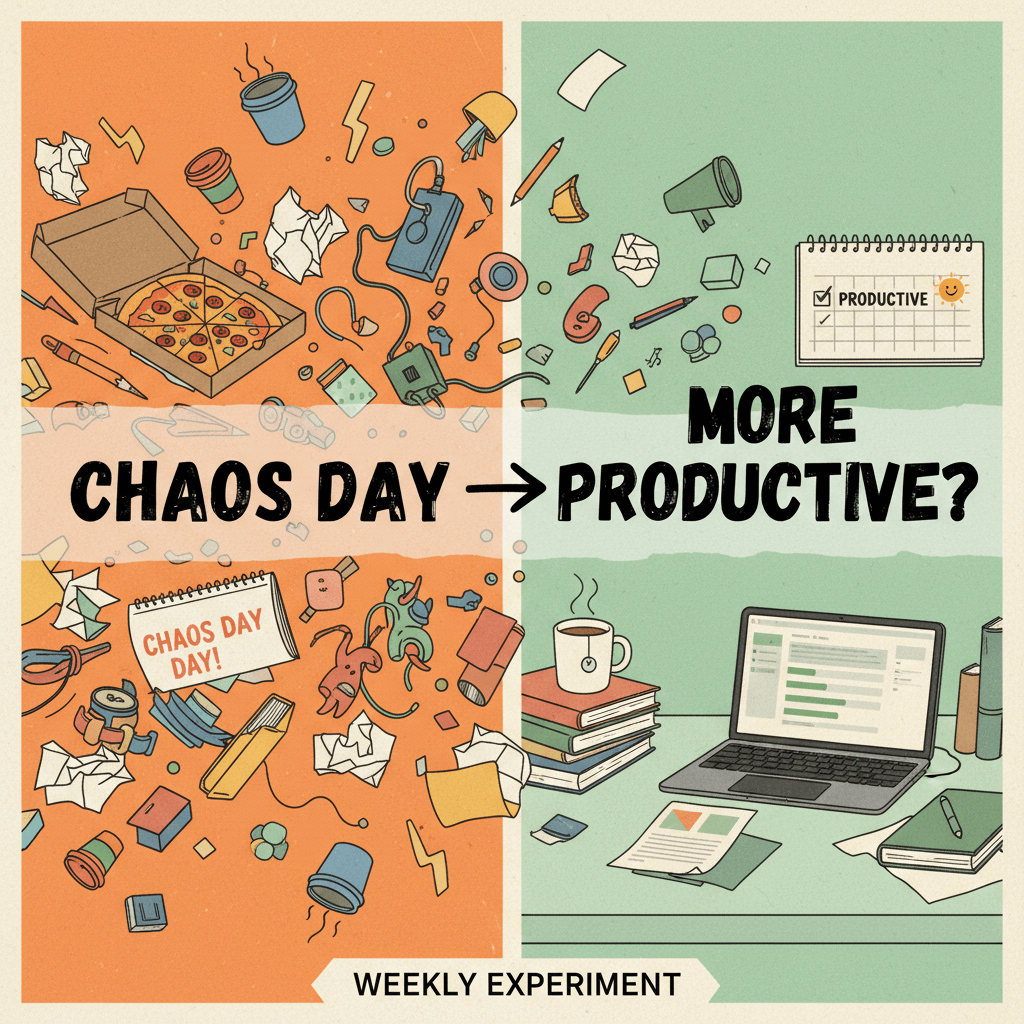
I didn’t plan to flip my week upside down. I was just tired. Tired of weeks blur-blending into each other. Tired of the quiet guilt that comes from pushing the interesting-but-not-urgent tasks into a nebulous “later.” Tired of small fires spiraling into big ones because the “right time” to fix them never arrived. So I did something I’d usually roll my eyes at: I blocked off a full day on my calendar and labeled it—half-jokingly—“Chaos Day.”
There were no guardrails that first time. I shut my inbox, closed my PM tools, and asked a simple question: if nothing else mattered today, what would I touch that could reduce long-term friction? I didn’t have a list. I didn’t have a plan. I had a cluttered desktop, a huge mental backlog, and a steady drip of “we should fix that someday” notes. I followed my nose. I untangled a brittle automation. I pruned a wiki that had turned into a museum. I wrote a script to pull metrics I’d been estimating by gut feel. By the end of the day, it looked like I had done nothing “important” from the outside—no new features, no shiny statements of progress. But everything felt lighter.
That week was the most productive I’d been in months. The tasks that used to feel like uphill climbs suddenly felt like smooth ramps. Meetings were quicker because I had better data. Tasks weren’t blocked because the small dependencies were gone. I slept better. So I did another one. And another. I started calling it “Chaos Day” out loud, prioritizing the odd and the overdue—the little dragons hiding in the corners of my work. And somehow, the more chaos I invited on that one day, the more order I created in the other four.
It wasn’t magical. It was mechanical: one day to intentionally surface and settle the messy, neglected work that quietly taxes the rest of the week. The payoff was immediate: fewer context switches, fewer avoidable delays, and a deeper well of momentum. The irony still makes me smile: scheduling chaos brought me more calm.
That’s the story. The rest of this piece is a playbook—shaped by trial, error, and conversations with teams—so you can try your own version and get the same lift. If you’re skeptical, good. If your calendar looks like a Tetris board, even better. The people with the least time often get the most out of this.
The Chaos Day playbook: structure, not anarchy
What a Chaos Day is (and isn’t)
A Chaos Day is a weekly, protected block dedicated to high-leverage, low-visibility work: the glue tasks, the repairs, the optimizations, the experiments, and the cross-pollination you never “have time” for. It is not a catch-up day for routine admin. It is not a dumping ground for procrastination. Think of it as maintenance for your system and fuel for your curiosity.
It is: a space to pay down friction, test ideas cheaply, and fix what blocks future flow. It isn’t: a vacation, a backlog sprint, or an excuse to blow deadlines. You still have outcomes; they’re just different from your usual output.
Why it works
Productivity dies by a thousand papercuts. Each unresolved quirk—an awkward template, an unclear SOP, an automation that fails twice a week—steals focus and energy in tiny, untraceable ways. Chaos Day concentrates attention on these energy leaks. You reclaim compounding time by removing repeated friction. You also inject novelty, which resets attention and stirs motivation, making the rest of your week sharper. There’s a second effect: when you dedicate time to preventive work, your reliability improves. Fewer surprises mean fewer emergency pivots that flatten your plans.
There’s also identity in it. When you routinely repair your system, you stop feeling like a passenger of broken processes. That sense of agency ripples out: you write tighter specs, you simplify your environment, and you stop tolerating slow-drain problems. The benefits compound.
How to set it up
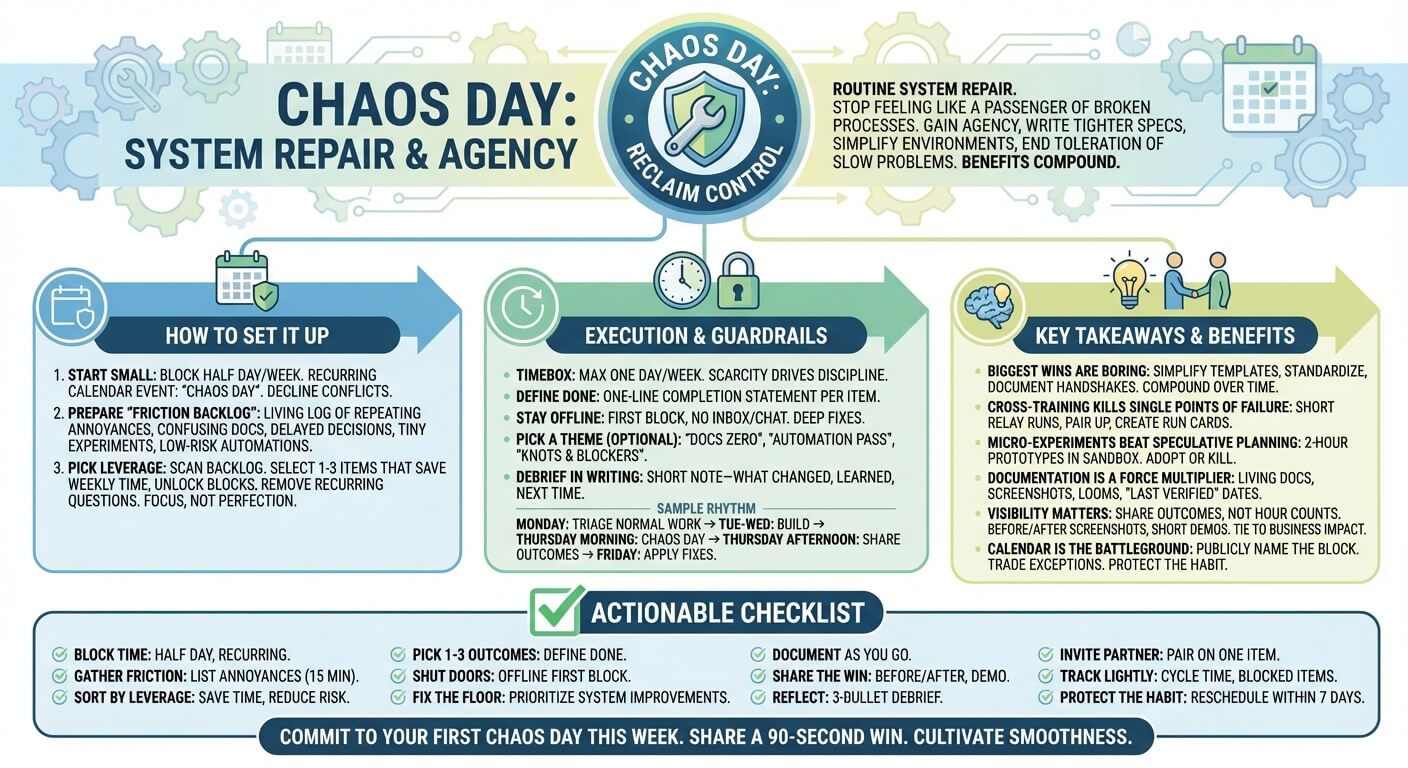
Start small. Pick a day and guard half of it. Put it on your calendar as a recurring event with no subject other than “Chaos Day.” You’ll be tempted to cave the first few times when a meeting request arrives. Decline. The muscles atrophy if you don’t train them. If you can’t swing a half day, start with two 90-minute blocks and expand.
Prepare a “friction backlog.” This is not your normal task list. This is a living log of:
- Repeating annoyances and small bugs
- Confusing docs, template mess, or onboarding gaps
- Delayed decisions that create uncertainty
- Tiny experiments you’ve wanted to try
- Low-risk automations, refactors, cleanups
- Cross-training or tool exploration that reduces single points of failure
On the morning of Chaos Day, scan the backlog and mark items by leverage: if completed, would this save time weekly? Unlock a blocked project? Remove a recurring question? Then pick one to three items that together fit your time window. Avoid micromanaging estimates. The goal is focus, not project plan perfection.
Guardrails that keep it useful
- Timebox it. No more than one day per week. Scarcity drives discipline.
- Define done. For each selected item, write a one-line completion statement: “New script generates weekly report with one command,” or “Updated SOP reduces steps from 12 to 6.”
- Stay offline for the first block. Inbox and chat are for after lunch. You’re here for deep fixes, not shallow pings.
- Pick a theme when useful. Themes like “Docs Zero,” “Automation Pass,” or “Knots and Blockers” give the day a spine.
- Debrief in writing. End with a short note: what changed, what you learned, what you’ll do next time.
A sample weekly rhythm
Monday: triage your normal work. Tuesday–Wednesday: build. Thursday morning: Chaos Day. Thursday afternoon: share outcomes. Friday: apply what you fixed while the memory is fresh.
You don’t need to be rigid. Some weeks, Chaos Day is two focused hours; other weeks, it’s a full-day reset. The key is consistency. Your system learns to expect repairs, and you learn to trust that not-everything-new matters more than fixing what’s broken.
Source: ModernWorkHacks.com – Started doing a weekly chaos day
Key takeaways from real discussions
I didn’t arrive at this alone. Conversations with engineers, designers, marketers, independent operators, and small teams surfaced useful patterns. Here are the takeaways that came up again and again when people tried their own Chaos Days and compared notes.
The biggest wins are boring
The wins that move the needle most aren’t glamorous: simplifying a template, writing a better checklist, naming files predictably, documenting a handshake between tools, or consolidating four dashboards into one. One designer shaved 20 minutes per deliverable by standardizing export presets. A founder reduced weekly meeting prep by automating agenda compilation. These aren’t headline victories—but they compound. The lesson: boring fixes are often the most lucrative.
- Ask: What do I repeatedly explain or redo?
- Automate, templatize, or eliminate it.
- Measure time saved once, then forget it—you’ll feel it in daily ease.
Cross-training kills single points of failure
Teams discovered that using Chaos Day for short “relay runs” made them more resilient. A marketer learned to run the analytics pipeline. An engineer practiced a deployment step usually owned by someone on vacation-prone time zones. Not everyone needs to be an expert; the goal is to ensure that urgent-yet-basic tasks don’t stall because one person is out.
- Identify the “only X can do Y” risks.
- Pair up for 45 minutes to walk through the steps.
- Create a one-page “run card” so anyone can perform the procedure in a pinch.
Micro-experiments beat speculative planning
Many people treated Chaos Day as an R&D sandbox. Instead of debating a new tool for weeks, they used two hours to try it on a sandbox project. Often the result wasn’t adoption—it was clarity: either “this tool doesn’t fit” or “this solves a precise pain.” Either outcome saved more time than a long comparative spreadsheet would have.
- Pick a single success condition for the experiment.
- Cap it: two hours to prototype, one hour to decide.
- Kill experiments that don’t clear the bar; promote those that do.
Documentation is a force multiplier
Teams that wrote as they fixed saw outsized benefits. A cleaned-up SOP (with screenshots), a short Loom recording, or a “Why we changed this” note meant knowledge didn’t evaporate. Future-you is also a teammate. One operations lead said, “We realized our docs shouldn’t be museums. They should be kitchens.” That mindset—living docs, used while cooking—helped the fixes endure.
- Add a “last verified” date to key docs to make upkeep explicit.
- Favor checklists over prose for recurring tasks.
- Include “gotchas” at the top: what breaks, what to watch for.
Visibility matters more than volume
People don’t need long status updates; they need to see that Chaos Day creates value. A simple before/after screenshot, a 90-second demo, or a short note that says “we eliminated three steps from partner onboarding” nurtures goodwill and protects your time block. When stakeholders see improved reliability (fewer rollbacks, fewer “where did that file go?” glitches), they quickly become fans.
- Share outcomes, not hour counts.
- Tie fixes to business impact where possible: faster turnaround, fewer errors, happier customers.
- Invite feedback on what slowed others this week and add those to the friction backlog.
The calendar is the battleground
Everyone agreed: if Chaos Day isn’t on the calendar, it will get eaten. The most successful teams set a recurring block and a team norm: no meetings during this time. When the exception is necessary, they trade. If you must give up a block this week, schedule a make-up block within seven days. Protect the habit more than the exact day.
- Name the block explicitly and publicly.
- Set your status to “Focus – Chaos Day” in your tools.
- Use office hours for questions that can’t wait, but don’t open the floodgates.
Measure, avoid pitfalls, and scale what works
What to measure (lightly)
You don’t need a dashboard army to know it’s working, but a few signals help you calibrate. Look for directional improvements rather than perfect numbers.
- Cycle time: Are tasks from start to finish moving faster week over week?
- Blocked work: Are fewer items getting stuck due to missing info or broken steps?
- Error rate: Are deployment rollbacks, content revisions, or support tickets down?
- Meeting time: Are recurring meetings shorter or easier because data and process are clearer?
- Energy and focus: Do you feel fewer context-switch whiplashes? Are “deep work” blocks easier to enter?
- Lead time for change: From idea to shipped fix—has it shortened?
Track a handful for three to four weeks. If nothing budges, adjust the contents of your Chaos Day: more friction removal, fewer experiments—or vice versa.
Common pitfalls (and fixes)
- Pitfall: Turning Chaos Day into a chores day. Fix: Raise the bar. Only choose tasks that reduce recurring pain or unlock momentum.
- Pitfall: Over-planning the day. Fix: Pick one to three outcomes and start. Momentum beats meticulous plans here.
- Pitfall: Treating it as optional. Fix: Put it on the calendar, set a status, make it visible. Negotiate, don’t sacrifice.
- Pitfall: Chasing interesting problems over meaningful ones. Fix: Sort by leverage. Ask: will this save future hours or prevent risk?
- Pitfall: No follow-through. Fix: End with a 10-minute debrief and a quick share. Make the invisible visible.
- Pitfall: Going alone in a team context. Fix: Invite one teammate to co-own a theme. Pairing increases stickiness.
Scaling from solo to team
For individuals, the rules above suffice. For teams, add light coordination without smothering spontaneity. A “theme of the week” helps align efforts—Docs, Testing, Tooling, Onboarding, Automation. Cross-functional pairing accelerates learning and reduces silo risks. Most teams discover that two or three high-leverage fixes each week are better than scattering across ten micro-tasks.
Consider a standing 15-minute pre-brief the day before: “What’s the one thing you’ll ship during Chaos Day?” Then a 15-minute show-and-tell afterward. Keep both brutally short and focused on outcomes. If you’re remote, record quick demos. Stakeholders love seeing friction drop in real time.
Remote, hybrid, and async adjustments
Distributed teams often face time zone friction. Chaos Day can smooth this by creating explicit handoffs. Document the change, tag the next person, and include a short video to eliminate ambiguity. Async doesn’t mean alone; it means deliberate.
- Create a shared “friction board” where anyone can nominate items.
- Vote or sort by estimated leverage—time saved per week, customer pain, or risk.
- Use comments to clarify “definition of done” before the day starts.
What to do when the week explodes
There will be weeks when emergencies spray across your calendar. When that happens, don’t abandon the habit—shrink it. Keep a 60-minute mini Chaos block. Do one surgical fix that makes next week easier. The goal is continuity, not perfection. It’s better to maintain the ritual than to wait for an ideal window that never arrives.
Your actionable checklist
You don’t need permission to try this. You need a calendar block, a friction backlog, and the courage to protect them. Here’s a simple checklist you can use today.
- Block time: Choose a half day this week and put “Chaos Day” on your calendar as recurring.
- Gather friction: Spend 15 minutes listing annoyances, blockers, and experiments in one place.
- Sort by leverage: Mark the items that save weekly time, reduce risk, or unlock stalled work.
- Pick 1–3 outcomes: Write a one-line definition of done for each.
- Shut doors: Start the day offline. Close inbox and chat for the first block.
- Fix the floor: Prioritize system-level improvements—templates, checklists, scripts—over one-off heroics.
- Document as you go: Add or update the relevant doc with “last verified” and key gotchas.
- Share the win: Post a short before/after or a 90-second demo to your team or notes.
- Reflect: Write a three-bullet debrief—what changed, what surprised you, what to try next week.
- Invite one partner: Pair on one item next time to spread knowledge and speed up learning.
- Track lightly: Choose two metrics for a month—cycle time and blocked items are great starters.
- Protect the habit: If you must miss, reschedule within seven days. Never let it vanish.
If you manage people, add a team layer:
- Set a norm: No meetings during Chaos Day unless mission-critical.
- Pick a weekly theme: Docs, Automation, Testing, Onboarding, or “Remove Three Steps.”
- Hold two 15-minute touchpoints: a pre-brief commitment and a post-brief show-and-tell.
- Create a friction board: Let anyone add items; sort by leverage and impact.
- Celebrate the unsexy: Shine light on the boring fixes that save the most time.
Over a month, watch for the compounding effects: cleaner handoffs, fewer “quick questions,” clearer decisions, and a team that trusts its own system. You’re not chasing speed; you’re cultivating smoothness. That’s what sustains productivity when the novelty fades and the workload rises.
The only part people struggle with at first is saying no. You’ll get a meeting request smack in the middle of your block. You’ll feel silly declining. You’ll feel like the grown-up thing is to be available. But availability is not the same as reliability. Reliability comes from a system that repairs itself regularly. After a few weeks of steady Chaos Days, you’ll have fewer emergencies, and the people who rely on you will notice. That is the quiet power of this ritual.
If your work is creative, technical, operational, or anything in between, you already know the undergrowth that trips you. The fix is not heroic. It is the humble, predictable practice of turning toward the mess for a little while—weekly, on purpose—so that order and momentum can do the rest.
Call to action: Commit to your first Chaos Day this week. Put it on your calendar right now. Pick one high-leverage fix and one tiny experiment. At the end of the day, share a 90-second before/after with someone who’d care. Then tell me what you changed and what you’ll try next—because the next set of key takeaways will come from your real discussions, and someone like you is waiting to borrow your insight.
Where This Insight Came From
This analysis was inspired by real discussions from working professionals who shared their experiences and strategies.
- Source Discussion: Join the original conversation on Reddit
- Share Your Experience: Have similar insights? Tell us your story
At ModernWorkHacks, we turn real conversations into actionable insights.





0 Comments